Introduction
Streaky text. A jam that stops a run. Prints that fade on one side of the sheet. If you've dealt with any of these on the shop floor, the fix usually starts in the same place: understanding what's actually happening inside the machine.
Inkjet technology covers a huge range, from compact office units to industrial presses cranking out 10,000 envelopes an hour. Both rely on the same core building blocks. They're just engineered for very different jobs.
This guide breaks down the printhead, ink delivery system, paper path, and control electronics that make inkjet printing work. Then it explains how commercial-grade machines re-engineer those same parts for speed, volume, and durability.
Key Takeaways
- Every inkjet printer depends on four core systems: printhead, ink delivery, paper transport, and control electronics
- The printhead is the single most critical part: clogged or misaligned nozzles cause most print quality complaints
- Commercial presses use fixed, page-wide printheads and bulk pigment ink instead of moving cartridges
- Routine cleaning of printheads, rollers, and ink lines prevents the majority of downtime and defects
How Does an Inkjet Printer Work?
At its simplest: a digital file gets sent to the printer, and the printhead fires microscopic ink droplets in precise patterns to form text and images. No physical impression, no plates. Just liquid ink placed exactly where the software tells it to go.
There are two main ways printheads eject that ink:
- Thermal (bubble jet): A tiny heater creates a vapor bubble inside the nozzle chamber, and the expanding bubble pushes ink out through the nozzle.
- Piezoelectric: Voltage flexes a ceramic actuator that squeezes ink out, with tight control over droplet size and timing.
Both are "drop-on-demand," meaning ink only fires when and where the image calls for it.

Why Inkjets Look Nothing Like Laser Printers
Open up an inkjet and you won't find a drum, toner powder, or a fuser unit. Laser printers use powdered toner to form an electrostatic image on a drum, then fuse it to the page with heat. That's an entirely different mechanical approach.
Inkjets skip all of that. Everything centers on liquid ink and how it's delivered, which is why the internal layout looks so different once you take the cover off.
Whether it's a desktop unit, a wide-format plotter, or a commercial envelope press, the same four categories apply: ink delivery, printhead, paper transport, and control system. The engineering inside each category is where most performance differences come from.
Core Components of an Inkjet Printer
Printhead
The printhead is the nozzle assembly where ink actually leaves the machine and lands on the page. It's where thermal or piezoelectric ejection happens, and it's the part most responsible for print quality.
Nozzle density matters a lot here. More nozzles packed more precisely into a print chip generally means finer detail and higher resolution. Manufacturer-specific designs can pack tens of thousands of nozzles into a single linehead to hit resolutions well above standard desktop output.
Clogged or misaligned nozzles are the number-one cause of streaky, faded, or banded prints. A single blocked nozzle can leave a thin white line running down every page you print until it's cleared.
The good news: most minor nozzle issues resolve with built-in tools.
- Automated cleaning cycles that flush dried ink out of the nozzle plate
- Alignment utilities in the printer driver or software that recalibrate droplet placement
- Manual nozzle checks that print a test pattern to spot gaps early
Fixed vs. Moving Printheads
Not all printheads work the same way mechanically. Cartridge-mounted printheads physically travel back and forth across the page, printing a narrow strip with each pass. Fixed, page-wide arrays don't move at all. HP PageWide architecture keeps the printhead stationary while the page moves past it, avoiding the multiple passes and pauses associated with traveling heads.
That difference explains a lot of the speed gap between a home printer and a commercial press. It's also the design behind iJetColor's HP FI-1000 PageWide printhead systems, which print full-color, full-bleed output in a single pass rather than shuttling a cartridge across the sheet.
Ink Cartridges & Ink Delivery System
Cartridges or tanks store the liquid ink and feed it to the printhead on demand. What's inside those cartridges matters more than most people realize.
There are two main ink chemistries:
- Dye-based ink: Delivers vivid color and strong gloss because the colorant penetrates absorbent paper — great for photos, less durable against moisture
- Pigment-based ink: Colorant particles sit on the surface rather than soaking in, giving strong light and water resistance — better suited for documents and mail that get handled or exposed to weather
Businesses printing anything that needs to survive handling, sunlight through a mail slot, or a damp mailbox tend to lean pigment.
iJetColor presses run pigment-based HP ink that is water, fade, and scratch resistant, which is why they suit envelopes and mail that get handled, sorted, and exposed to weather in transit.

Individual CMYK cartridges vs. bulk tanks is the other major decision point. Small cartridges cost more per page but require less upfront investment. Bulk ink systems cost less per piece over time but assume higher volume to justify the tank size. Commercial operations printing tens of thousands of pieces a month almost always land on bulk tanks for this reason.
One overlooked detail: ink delivery tubes and dampers regulate pressure and flow between the tank and the printhead. When they wear out or trap air bubbles, you get misfires or banding that looks like a printhead problem but isn't.
Carriage & Belt Assembly
In cartridge-style printers, the carriage is what physically drags the printhead across the page. It rides on a belt driven by a motor, with an encoder strip running alongside it that tracks exact carriage position so droplets land where they're supposed to.
That encoder strip is thinner and more delicate than most users expect — often a clear plastic strip with fine black lines that the printer reads dozens of times per second. Grease or dust on it can cause distorted characters, vertical line errors, or a grinding noise as the carriage struggles to track position.
Worn belts and dirty encoder strips are a leading cause of banding and misalignment in desktop and small business printers.
Production-grade presses often skip this assembly entirely. Fixed page-wide arrays (covered above) remove the carriage, belt, and encoder strip from the maintenance list—one less set of wear parts to manage at volume.
Paper Feed System (Rollers & Trays)
Every printer needs a way to move media from a stack into the printhead's path and back out again. That's the job of pickup rollers, feed rollers, and the trays or cassettes that hold the stock.
Worn rollers are a common and frustrating failure point:
- Smooth or glazed roller surfaces lose grip and cause misfeeds
- Two sheets can pull through at once, causing double-feeds
- Skewed pickup leads to jams mid-print
Sensors positioned along the paper path detect when media doesn't arrive where and when it's expected, pausing the job before ink gets sprayed onto a jammed sheet or the printhead gets damaged.
Industrial inkjet systems take this further. Standard desktop printers are built around plain paper in a fairly narrow thickness range. Commercial presses need adjustable feed mechanisms because they run envelopes, cardstock, and packaging: materials that vary widely in weight and rigidity.
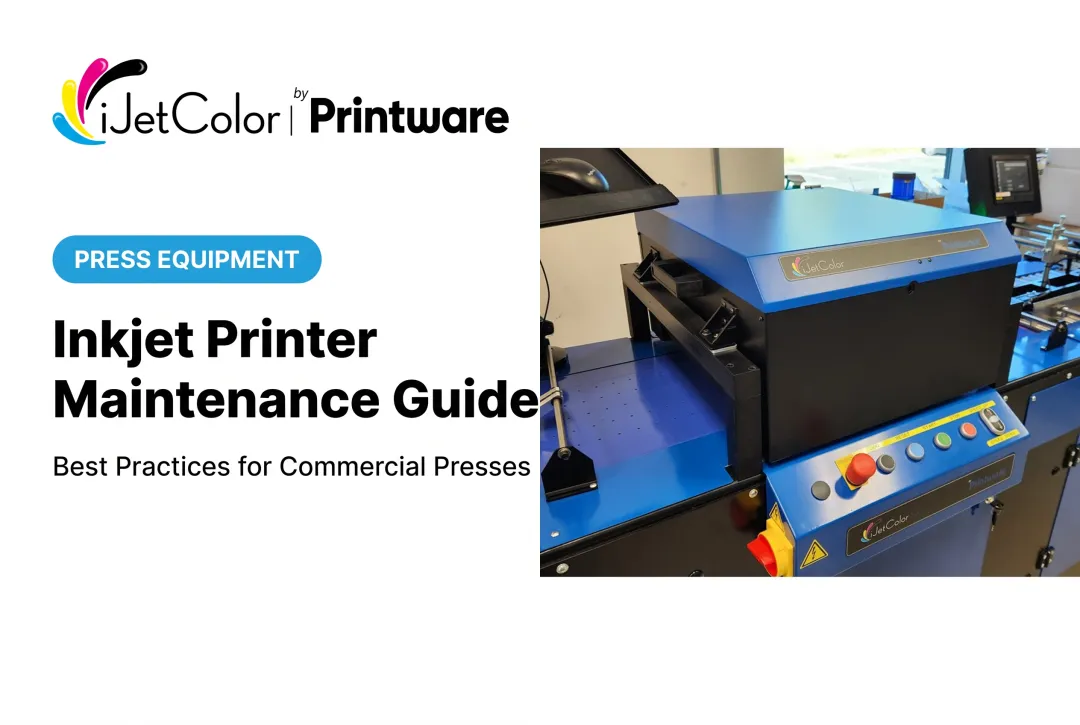
The HP iJetColor 1175 Pro + PXG, for example, feeds envelopes from 2" x 3.5" up to 12" x 17" at up to 3/8" thick, and packaging up to 14" x 20" at up to 1/2" thick, pairing its Straight Shooter vacuum feed with an integrated PXG feeder to keep varied substrates moving without jamming.
Supporting Components That Keep Everything Running
A few supporting parts keep the whole system operating day to day.
- Control panel: Touchscreen or button interface for job selection, status monitoring, error codes, and firmware updates—often with RIP integration for job queuing and variable data on commercial presses.
- Power supply unit: Converts and regulates electricity for motors, the printhead, and onboard electronics. Power fluctuations are a common cause of unexpected shutdowns and corrupted jobs.
- Connectivity ports/network interface: USB, Wi-Fi, and Ethernet links for printing from computers, mobile devices, or network servers—essential when you personalize thousands of mail pieces per run.
None of these parts touch the ink directly, but a failure in any of them can stop production just as fast as a clogged nozzle.
Desktop vs. Commercial-Grade Inkjet Printer Components
The component categories don't change between a home printer and an industrial press. What changes is how each part gets engineered.
Printheads are the clearest example. Desktop and small-business inkjets almost always use cartridge-mounted heads that travel across the page. Commercial presses increasingly use fixed, page-wide arrays (HP PageWide and HP TIJ 4.0 thermal inkjet technologies are the dominant designs here) that print the full width of the media in a single pass instead of multiple sweeps.
The output scale gap is significant. A fast business inkjet tops out around 20-25 pages per minute. Commercial sheetfed inkjet presses are measured in thousands of sheets per hour instead. Some production systems exceed 9,000 sheets an hour, and high-volume web presses push past 400,000 pages an hour. Different formats, different units, but the gap in category is unmistakable.
Substrate flexibility shows the same divide:
| Feature | Desktop Printer | HP iJetColor 1175 Pro + PXG |
|---|---|---|
| Printhead design | Moving cartridge | Fixed HP FI-1000 array |
| Max substrate thickness | Standard paper only | 3/8" envelopes, up to 1/2" packaging |
| Typical output | 20-30 ppm | 10,000+ envelopes/hour |
| Ink system | Small cartridges | Bulk pigment tanks |
That feed range on the 1175 Pro + PXG is what lets it run envelopes, paper bags, and small corrugate that would jam or simply not fit through a standard carriage-style feeder.
Cost efficiency is where commercial components deliver the biggest business impact. Small cartridges carry a high cost-per-page because you're buying convenience and low volume. Bulk ink tanks and durable pigment formulations in commercial machines cut cost-per-piece dramatically. iJetColor positions its presses as faster and more profitable for short-run envelope production than offset, outsourcing, or toner.
If your shop is currently outsourcing envelope or short-run mail printing, these component differences have a direct payoff: page-wide printheads, bulk pigment ink, and a feeder built for envelopes let you bring that work in-house and run it in a single pass.

Maintenance Tips to Extend the Life of Your Inkjet Printer Parts
Most inkjet problems trace back to skipped maintenance, not defective hardware.
- Run printhead cleaning cycles and alignment checks regularly. Don't wait for visible streaking. Catching a partially clogged nozzle early is far easier than recovering a fully blocked one.
- Use manufacturer-recommended or certified inks. Off-brand ink can damage nozzles and delivery tubes, and it lacks the durability testing behind certified pigment formulations.
- Inspect rollers and belts on a schedule, not just after a jam. Worn feed rollers and encoder strips drive a large share of unplanned downtime.
- Keep firmware updated. In high-volume production, a single software bug can halt a run of thousands of pieces.
For commercial presses, build these into the schedule:
- Replace wiper rollers with every printhead change
- Clean service stations monthly
- Track printhead impressions to time replacements before quality slips
Frequently Asked Questions
What are the internal parts of a printer?
The core internal parts are the printhead, ink delivery system, carriage or fixed printhead array, paper feed rollers, control board, and power supply. These systems cover droplet ejection, ink supply, and moving paper through the machine.
What is the most important part of an inkjet printer?
The printhead is the most critical component because it directly determines print quality. It is also typically the costliest part to replace, so manufacturers include cleaning and alignment tools to extend its life.
How does an inkjet printhead work?
An inkjet printhead uses either thermal or piezoelectric technology to force tiny ink droplets through nozzles onto the page. Thermal heads use heat to create a bubble that pushes ink out; piezoelectric heads use a voltage-driven element to physically squeeze ink through.
What's the difference between dye-based and pigment-based ink?
Dye-based ink produces vivid color and strong gloss but fades and smears more easily when exposed to water. Pigment-based ink is more fade- and water-resistant since its colorant sits on the media surface rather than soaking in.
Are commercial inkjet printer components different from home printer parts?
Yes. Commercial presses use fixed, page-wide printheads, bulk ink systems, and reinforced paper paths built for volume and varied substrates. Home printers rely on moving cartridge-style printheads and smaller ink cartridges designed for lower, intermittent output.
How often should inkjet printer parts be replaced or maintained?
Printheads and rollers should be cleaned and inspected regularly, though exact intervals vary by usage volume and manufacturer guidance. High-volume commercial presses usually schedule maintenance by impression count or duty cycle, not calendar time alone.